
Why I am writing this
I recently worked on a Customer 360 degree solution for a bank. The requirement sounded simple in the beginning:
“Can we show one complete view of the customer?”
As usual, the simple sentence had a lot hidden behind it.
One team wanted it for relationship managers. Another wanted it for contact center agents. Product teams wanted next-best-action and campaign eligibility. Risk teams wanted warning signals. Digital channels wanted a faster and more personalized experience.
Everyone used the words “single view of customer”, but they did not always mean the same thing.
This blog is my attempt to document the architecture and the practical lessons while the implementation is still fresh in my mind. The names, exact systems, and a few details are intentionally changed, but the architecture problems are real.
What Customer 360 really means in a bank
Customer 360 is not just a screen.
It is also not just a data warehouse.
For a bank, Customer 360 is a controlled way to answer questions like:
- Who is this customer?
- What products does the customer hold?
- What is the latest interaction we had with the customer?
- What are the customer’s preferences and consent choices?
- Are there any risk, service, or relationship signals that the employee or channel should know?
- Which data can this user see for this purpose?
The last question is the one many teams ignore in the first version. In banking, that is usually where the architecture starts becoming serious.
The trigger
The trigger was not a fancy AI use case. It was a very ordinary operational problem.
A customer would call the contact center about a failed transaction. The agent could see some details in the contact center system, some in the card system, some in core banking, and some in the digital banking admin console. If the same customer also had a loan relationship, that information was in yet another place.
The agent was doing system integration manually.
This is a bad experience for the customer and a frustrating experience for the employee. It also creates risk because people start copying information into notes, Excel sheets, emails, and chat messages just to get work done.
That was the point where Customer 360 stopped being a dashboard idea and became a platform concern.
Reference architecture
The architecture we settled on was layered. We did not want every channel to integrate with every source system directly. That approach looks fast for the first journey and becomes painful from the third journey onwards.
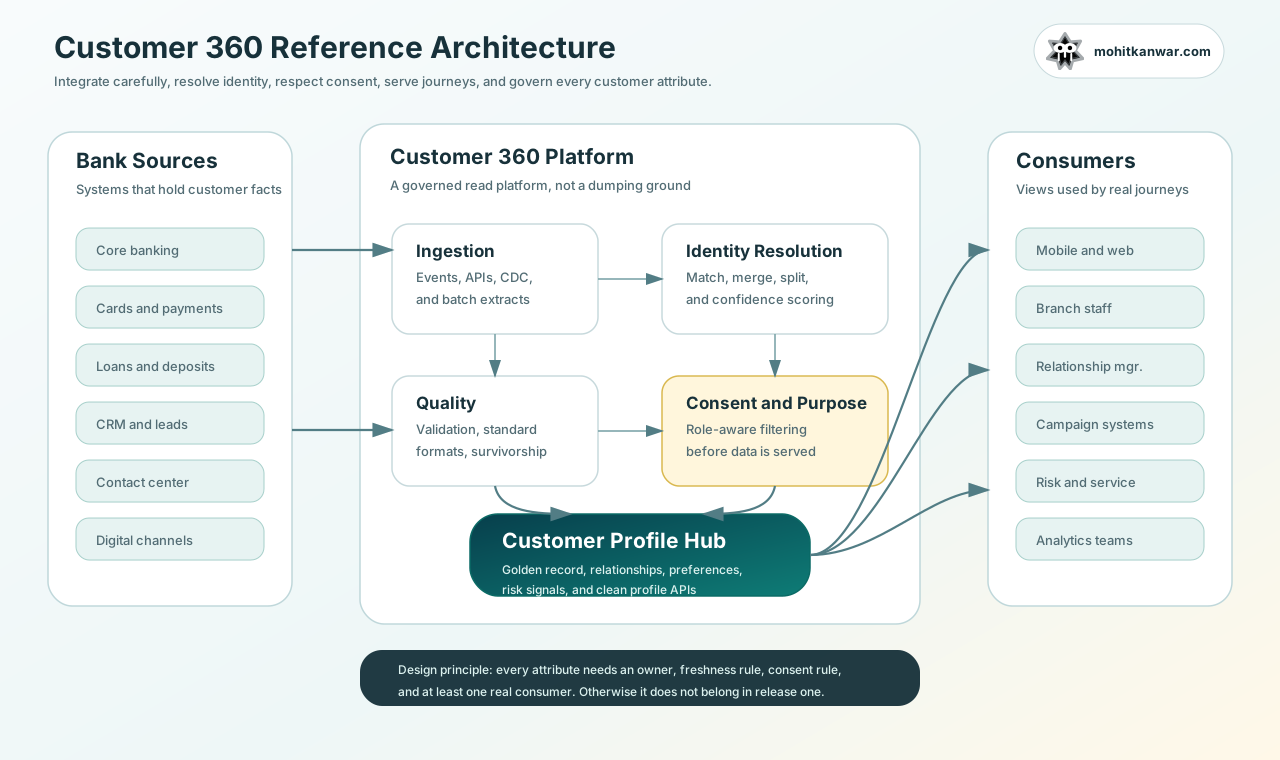
At a high level, the solution had the following parts:
- Source systems - core banking, cards, loans, CRM, contact center, digital channels, marketing systems, and risk platforms.
- Ingestion layer - APIs, change data capture, events, and batch loads depending on what each source system could support.
- Data quality layer - validation, standardization, deduplication, survivorship rules, and source lineage.
- Identity resolution - matching customer records across systems and maintaining confidence scores.
- Consent and purpose checks - deciding what information can be shown to whom and for which business purpose.
- Customer profile hub - the read model that exposed the usable customer view.
- Profile APIs - clean APIs for channels and internal systems.
- Governance and observability - data freshness, audit, lineage, issue queues, and SLA monitoring.
The important lesson for me was this: the Customer 360 platform should not become a dumping ground. Every attribute needs an owner, a freshness expectation, a purpose, and at least one real consumer.
Start with journeys, not data fields
One early mistake in such programmes is to create a giant spreadsheet of customer attributes.
Name, mobile number, email, address, KYC status, accounts, cards, loans, transactions, service tickets, complaints, RM details, campaign preferences, nominee details, risk score, and so on.
The list keeps growing because every team can think of one more field. Initially, we started with a dashboard, with a long list of fields. The team was excited about the data we could show, but the excitement faded when we realized that not every field was useful for every journey. It not only cluttered the UI, but also created a lot of unnecessary data access and consent complexity.
The users mentioned that they needed every field, but when we asked them to show us how they would use it in a real scenario, the answer was often “I don’t know” or “I will figure it out later”.
After a few prototype iterations, we realized that we needed to start with journeys instead of fields. We needed to understand the context in which a banker or agent would use the data, and what decisions they would make from it.
Instead of a single view of the customer, we created multiple views for different journeys. Each view had a limited set of fields that were relevant to that journey. e.g. we started with two journeys: contact center servicing and relationship manager advisory. For each journey, we documented what the user needed to know and what we intentionally avoided showing.
| Journey | What the user needed to know | What we intentionally avoided |
|---|---|---|
| Contact center servicing | Products held, recent service tickets, failed transaction context, preferred language | Full financial history if not needed |
| Relationship manager view | Portfolio summary, upcoming renewals, relationship signals, consented contact preferences | Sensitive authentication data |
This helped the team because we could ask a sharper question:
“Who will use this field, in which journey, and what decision will they take from it?”
If we could not answer that, the field did not go into the first release.
Data flow
The data flow was not complicated on paper, but the details mattered.
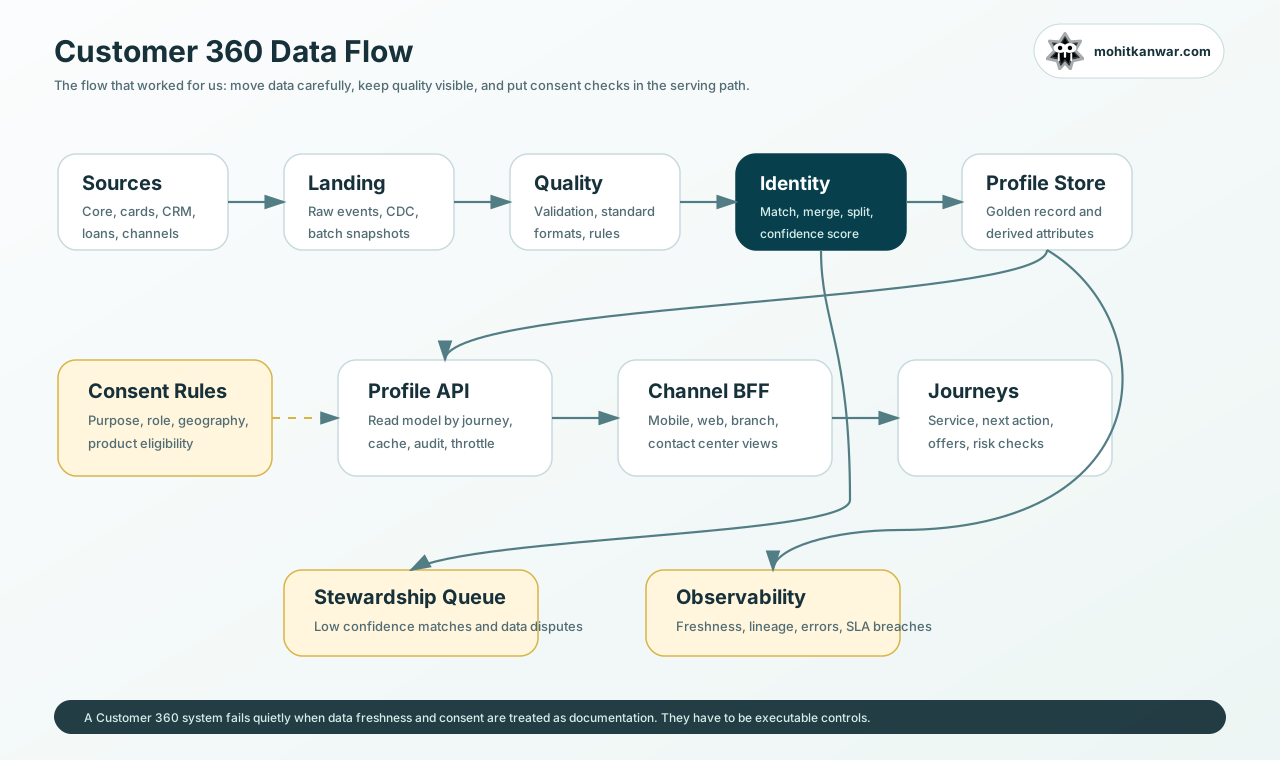
We handled different source systems differently:
- Core banking was treated carefully because it was the system of record for many product relationships.
- Cards and payments had faster event needs because failed transactions and disputes become customer-service issues quickly.
- CRM had useful relationship and lead data, but data quality was uneven.
- Contact center had interaction history, which was useful, but not every note should be visible everywhere.
- Digital channels gave us useful preference and behavioral signals, but those signals needed consent and purpose checks.
Not every source system could give real-time events. Some systems could only provide batch files or scheduled extracts. Instead of pretending everything was real time, we documented freshness explicitly.
For example:
| Data area | Freshness expectation | Why |
|---|---|---|
| Customer name and identifiers | Near real time | Incorrect identity breaks every journey |
| Product holdings | Same day or better | Needed by service and RM journeys |
| Recent card failures | Few minutes | Needed during customer calls |
| Campaign eligibility | Daily | Usually not a servicing blocker |
| Relationship notes | Near real time | Staff decisions depend on recent context |
This small table prevented many architecture arguments. Once business and technology agreed on freshness, the ingestion pattern became easier to decide.
Identity resolution was the hardest part
The most difficult part of Customer 360 is not the UI. It is identity.
The same customer may exist in multiple systems with small variations:
- Different mobile number formats
- Old addresses
- Name spelling differences
- Joint account relationships
- Corporate and retail overlaps
- Minor accounts, guardians, nominees, and authorized signatories
- Different customer IDs created during migrations
If we merged too aggressively, two different people could become one profile. If we were too conservative, the same customer would remain split across systems.
We used a match confidence model instead of a blind merge.
{
  "customerProfileId": "cp_91f4a",
  "sourceMatches": [
    {
      "source": "core",
      "sourceCustomerId": "CIF-100245",
      "confidence": 1.0,
      "matchReason": "primary-system-record"
    },
    {
      "source": "cards",
      "sourceCustomerId": "CARD-CUST-7712",
      "confidence": 0.92,
      "matchReason": "document-number-and-mobile"
    },
    {
      "source": "crm",
      "sourceCustomerId": "CRM-4922",
      "confidence": 0.74,
      "matchReason": "name-and-email"
    }
  ],
  "requiresStewardReview": true
}
Anything below the agreed confidence threshold went to a stewardship queue. This sounded like extra work, but it saved the platform from building trust on weak data.
In my view, a Customer 360 solution without a stewardship process is incomplete. Bad matches will happen. The architecture should accept that and create a correction path.
Consent and purpose cannot be an afterthought
A bank has a lot of customer data, but that does not mean every user should see everything.
We made consent and purpose part of the serving path. The profile API did not just fetch a profile and return it. It also checked the requesting application, role, purpose, region, and consent state.
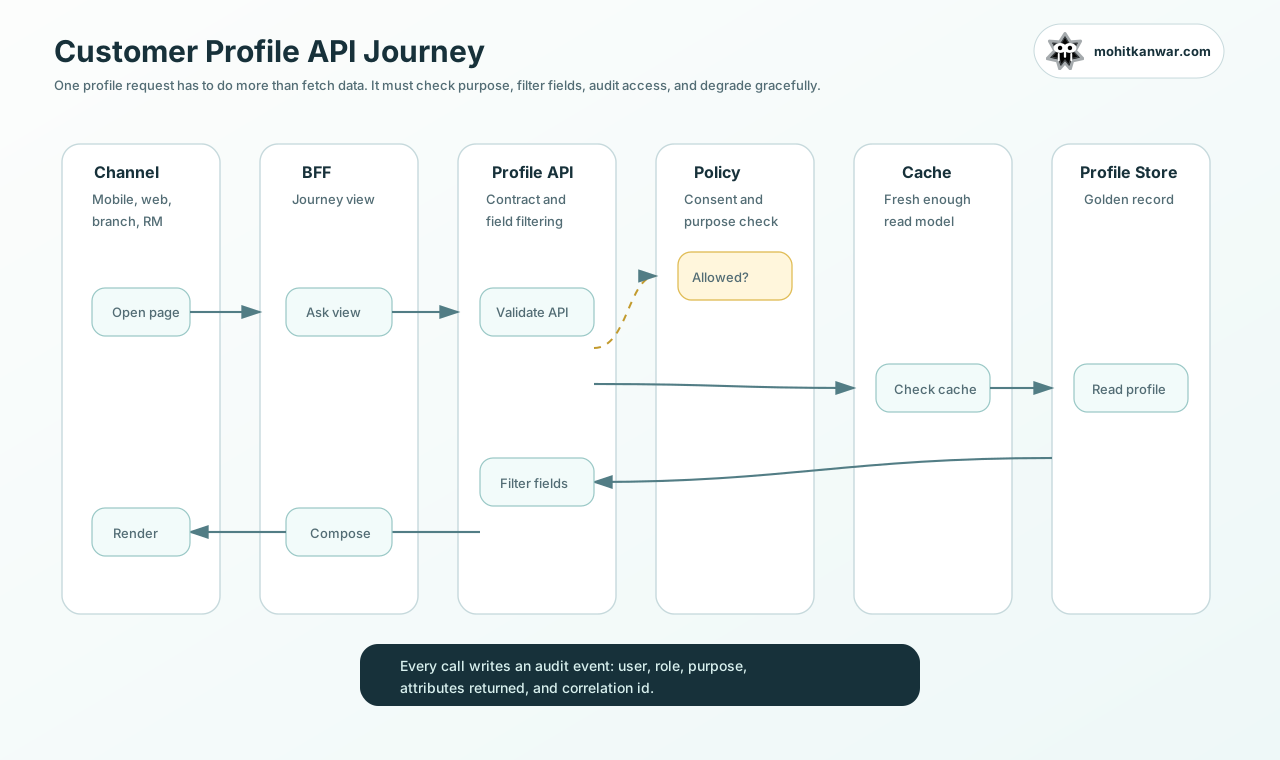
A simplified request looked like this:
GET /customer-profiles/{profileId}?view=contact-center-summary
X-User-Role: contact_center_agent
X-Purpose: customer_service
X-Correlation-Id: 7e9c2f0d
The API response was not the same for every channel.
{
  "profileId": "cp_91f4a",
  "displayName": "A. Sharma",
  "relationshipSince": "2018-04-12",
  "preferredLanguage": "Hindi",
  "products": [
    { "type": "Savings Account", "status": "Active" },
    { "type": "Credit Card", "status": "Active" }
  ],
  "recentSignals": [
    {
      "type": "failed-card-transaction",
      "time": "2026-06-19T09:22:11+05:30",
      "action": "show-agent-guidance"
    }
  ],
  "hiddenFields": [
    {
      "field": "marketingPreferences",
      "reason": "not-required-for-purpose"
    }
  ]
}
The hiddenFields part was useful during testing. It helped teams understand that data was not missing because of an integration defect. It was filtered because the purpose or role did not allow it.
We also wrote an audit event for every profile access:
{
  "eventType": "customer_profile_viewed",
  "profileId": "cp_91f4a",
  "requestedBy": "user_2451",
  "role": "contact_center_agent",
  "purpose": "customer_service",
  "view": "contact-center-summary",
  "attributesReturned": ["displayName", "products", "recentSignals"],
  "correlationId": "7e9c2f0d"
}
This is boring work, but important work. In banking architecture, boring controls often protect the exciting features.
API design
We avoided creating one giant API called /customer360.
That API becomes a kitchen sink very quickly.
Instead, we created views around user journeys:
| API view | Consumer | Use case |
|---|---|---|
contact-center-summary | Contact center BFF | Fast servicing context |
relationship-manager-summary | RM portal | Portfolio and relationship context |
digital-personalization | Mobile/web BFF | Eligible offers and preferences |
risk-review-summary | Risk tools | Risk flags and relationship graph |
complaint-context | Complaint platform | Complaint history and affected products |
Each view had a contract, a freshness expectation, and an owner.
This gave us two benefits:
- Channels did not need to understand every source system.
- Data access could be controlled at the profile API layer instead of being spread across many applications.
What we cached
Caching was needed, but we were selective.
We cached profile read models that were expensive to assemble and safe to reuse for a short period. We did not cache sensitive or volatile information blindly.
The cache key included the view and purpose, not just the customer profile ID.
customer-profile:{profileId}:{view}:{purpose}:{role}
This mattered because the same customer profile could produce different responses for a contact center agent and a relationship manager.
We also made freshness visible in the response:
{
  "profileId": "cp_91f4a",
  "view": "relationship-manager-summary",
  "dataFreshness": {
    "productHoldings": "2026-06-19T08:55:00+05:30",
    "crmNotes": "2026-06-19T09:18:00+05:30",
    "campaignEligibility": "2026-06-19T02:00:00+05:30"
  }
}
This avoided a common support problem where users assume all information is live. If a field is updated daily, say it clearly.
Data quality dashboard
The data quality dashboard became more important than we expected.
We tracked:
- Number of profiles created
- Duplicate candidates
- Low-confidence matches
- Missing mandatory identifiers
- Source system latency
- Data freshness by attribute group
- Failed ingestion jobs
- Consent filtering counts
- API error rates
One useful metric was “profile completeness by journey”. A customer profile may be complete for contact center servicing but incomplete for relationship manager advisory. Completeness should be measured against a use case, not against an abstract master-data dream.
What I would repeat
If I had to start again, I would repeat these decisions:
- Start with journeys, not a universal data model.
- Keep source lineage for every important attribute.
- Treat identity resolution as a product capability, not a one-time migration task.
- Put consent and purpose checks in the API path.
- Make data freshness visible to users and support teams.
- Create a stewardship queue from the first release.
- Keep the first release small enough that people can actually use it.
What I would be careful about
I would be careful about these traps:
- Trying to solve all customer data problems in one release - it makes the platform too big and delays value.
- Calling the data lake a Customer 360 solution - storing data and serving trusted customer views are different problems.
- Ignoring staff experience - branch and contact center users need speed and clarity, not a beautiful but slow dashboard.
- No owner for attributes - without ownership, data quality issues keep circulating without resolution.
- No audit trail - in a bank, you should be able to explain who viewed what and why.
- Over-personalization without consent - personalization should not surprise the customer or the regulator.
Final thought
Customer 360 is one of those initiatives that looks like a data project from far away, but becomes an architecture, governance, and operating-model project when you get closer.
The screen is only the visible part.
The real work is in identity, quality, consent, ownership, APIs, and trust. If those foundations are weak, the dashboard may still look impressive, but users will stop trusting it after the first few wrong answers.
For me, the success of a Customer 360 platform is not whether it has hundreds of fields. It is whether a banker can answer the customer’s question faster, with the right context, and without breaking trust.
Related Reading
- Digital Banking Modernization Case Study - a broader transformation narrative across channels, APIs, governance, and execution
- The Technology of Modern Banks - how the major technology layers of a modern bank fit together
- The Test Data Dilemma - why realistic but safe data matters in financial systems
- Understanding the Logging Architecture - observability patterns that also apply to Customer 360 platforms
Building a customer data or digital banking platform?
I help banking and fintech teams turn architecture decisions into practical delivery plans, especially when channels, data, security, and governance need to work together.