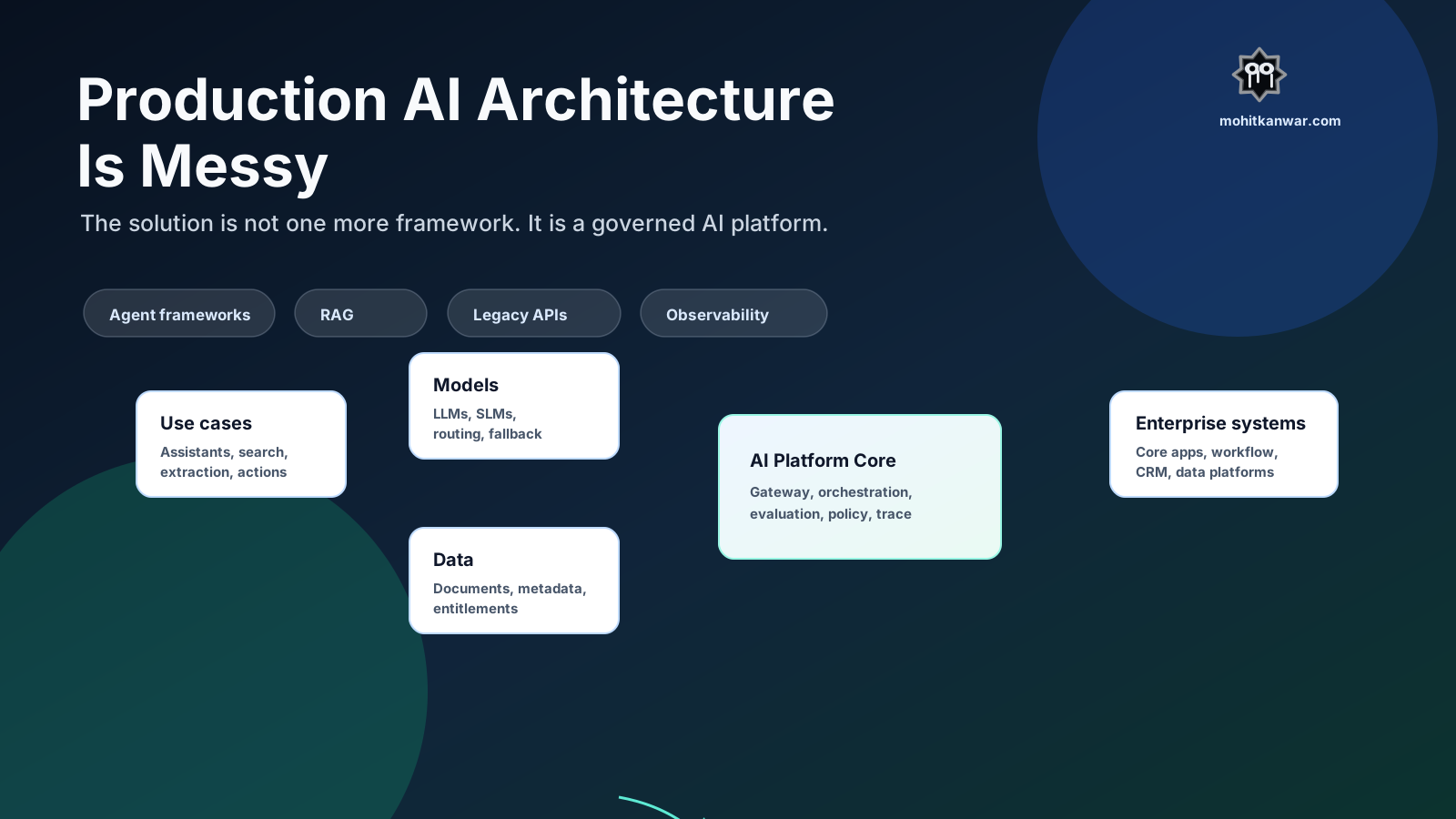
Why I am writing this
Most AI architecture problems do not show up in the first demo.
In a demo, the scope is small. The documents are handpicked. The users are friendly. The model is usually called directly. Nobody is asking too many questions about audit, retries, cost, access control, or who will support the system at 2 AM.
The demo works, and that is useful.
The trouble starts when the same idea has to support a real business journey.
Then the questions change quickly:
- Which model route should be used, and what is the fallback?
- Which data can this user retrieve for this purpose?
- What happens when the workflow crosses multiple systems or takes hours?
- How do we prove what context, prompt, model, and tools were used?
- How do we know the answer is good enough to show to a user?
- Who supports this when it fails in production?
That is the point where AI stops being a model problem and becomes an architecture problem.
The model is still important, but it is no longer the whole story. In production, the hard part is the system around the model.
The problem
Production AI architecture becomes messy when teams try to build enterprise-grade AI systems with demo-grade boundaries.
The real problem is not just model selection. It is not just RAG. It is not just agents.
The problem is that three things are often unclear:
- Boundary - what belongs to the product team, what belongs to the AI platform, and what belongs to enterprise systems.
- Ownership - who owns prompts, tools, data sources, evaluations, model routes, and production incidents.
- Proof - how the organization knows that an AI output was allowed, grounded, useful, and safe enough for the journey.
Once these are unclear, every use case starts making its own decisions.
That is how a simple assistant turns into another integration layer nobody fully owns.
This becomes harder because AI sits on top of normal enterprise realities: legacy systems, data permissions, audit requirements, latency expectations, cost pressure, security reviews, business ownership, and production support.
A chatbot connected to a vector database is not an enterprise AI architecture.
An agent framework connected directly to production systems is also not an enterprise AI architecture.
Both may be useful building blocks, but neither is enough by itself.
The architecture needs to make responsibilities explicit before the number of use cases grows.
What makes it messy
The mess usually appears in layers.
One team chooses an agent framework. Another team chooses a different vector database. Someone adds a workflow engine because agents need durable execution. Someone adds a tracing tool because normal application logs are not enough. Another team adds browser automation. Another team creates a separate prompt management process. Security asks for masking and audit. Compliance asks who saw what data. Operations asks how to monitor failures.
In real programmes, this usually does not happen because one person made a bad architecture decision. It happens because every team is solving the immediate problem in front of it. The first few choices look harmless. The damage appears later, when the organization has to operate, audit, upgrade, and govern all of those choices together.
None of these tools are automatically wrong.
The problem starts when useful tools are added without a shared operating model.
| Area | Demo assumption | Production reality |
|---|---|---|
| Models | Call the best available model | Route by task, risk, latency, cost, region, and fallback |
| Prompts | Keep prompts in application code | Version prompts, test them, and tie them to release gates |
| RAG | Upload documents and retrieve chunks | Govern sources, metadata, permissions, freshness, and citations |
| Agents | Let the agent decide the next step | Constrain tools, state, retries, approvals, and stop conditions |
| Workflows | Run everything inside the request | Use durable execution when work crosses time, systems, or approvals |
| Observability | Log request and response | Trace prompt, context, model, tools, policy, cost, and quality |
| Legacy systems | Call APIs directly | Put approved tool contracts and audit controls in between |
Suddenly the architecture has become a pile of useful parts with unclear boundaries.
The problem is not that the tools are bad. The problem is that the ownership model is weak.
When each AI use case builds its own stack, the enterprise ends up with multiple ways to call models, multiple prompt formats, multiple RAG pipelines, multiple tracing approaches, multiple security exceptions, and multiple answers to the same audit question.
This is how AI architecture becomes expensive before it becomes useful.
The warning sign is simple: every team can explain its own demo, but nobody can explain the full production control plane.
Production AI is not one workload
One mistake I see often is that teams treat every AI requirement as the same kind of problem.
They are not the same.
| Use case type | Example | Architecture needed | What to avoid |
|---|---|---|---|
| Knowledge Q&A | “What is the policy for account closure?” | RAG, citations, access control | Agentic workflows for simple lookup |
| Summarization | “Summarize this complaint history.” | Prompt contract, context window strategy, review rules | Unbounded context from every system |
| Extraction | “Extract fields from this document.” | Schema validation, confidence score, exception queue | Free-form output with no validation |
| Decision support | “Recommend the next best action.” | Data quality, rules, explanation, human judgment | Letting the model become the policy engine |
| Agentic workflow | “Investigate this failed payment and prepare a response.” | Orchestration, tools, state, approvals, audit | Tools with write access and no guardrails |
If we use an agent for everything, the system becomes unnecessarily complex.
If we use plain RAG for everything, the system becomes too limited.
The first architecture decision should be classification:
What kind of AI workload is this?
Only after that should we choose the pattern.
Reference architecture
I prefer thinking about production AI as a platform capability with clear layers.
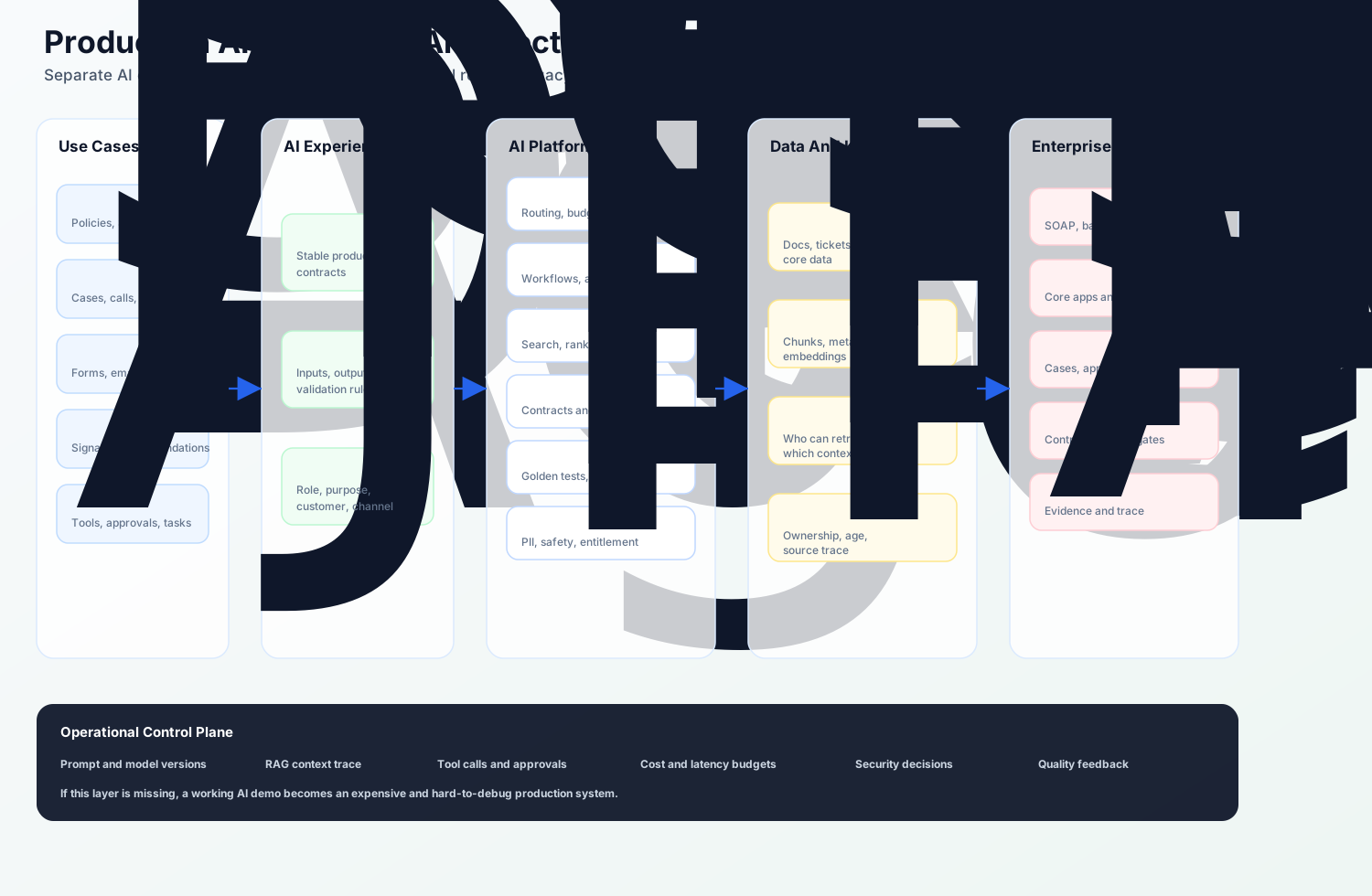
The exact tools will differ from organization to organization, but the responsibilities should be clear.
At a high level, the architecture needs these parts:
- Use case layer - the actual business journeys where AI is useful.
- AI experience APIs - stable contracts exposed to products and channels.
- AI platform core - model gateway, orchestration, retrieval, tool registry, evaluation, and policy.
- Data and knowledge layer - source connectors, indexes, metadata, entitlements, and lineage.
- Enterprise integration layer - safe wrappers around legacy systems, workflow systems, and audit stores.
- Operational control plane - tracing, prompt versions, cost, latency, quality, policy decisions, and support evidence.
Before going deeper, this is how I am using a few terms:
| Term | Meaning in this architecture |
|---|---|
| AI capability API | A business-facing API such as policy answer, case summary, or document extraction. It hides model and provider details from product channels. |
| Model gateway | A controlled entry point for model calls, routing, prompt versions, rate limits, fallback, usage, and cost. |
| Tool contract | An approved interface that lets AI read from or act on enterprise systems with validation, permissions, retries, and audit. |
| Evaluation harness | A repeatable test setup for retrieval quality, answer quality, safety, regressions, and release gates. |
The main design principle is simple:
Product teams should consume AI capabilities. They should not assemble AI infrastructure for every use case.
This does not mean every team must wait for a central group before building anything. That would kill momentum.
It means the organization needs a small number of non-negotiable boundaries.
The boundaries I would enforce
If I were setting up this architecture, I would keep the rules boring and explicit:
- Product applications call AI capability APIs, not model providers directly.
- Agents call approved tools, not enterprise systems directly.
- Retrieval returns authorized knowledge, not whatever is semantically similar.
- Prompts, model routes, tools, and evaluations are versioned together.
- Every production response has a trace that can explain what happened.
- High-risk actions go through workflow and approval, not pure model output.
These rules are not meant to slow down teams. They prevent every project from rediscovering the same controls.
The platform should provide the paved road. Product teams should still own the journey, the user experience, and the business outcome.
Layer 1: Use cases before platforms
It is tempting to start with “we need an AI platform”.
That is too broad.
Start with real use cases and classify them.
For each use case, I would ask five questions first:
- Is this read-only or action-taking?
- Which enterprise data does it need, and how fresh should that data be?
- Does the output need citations, explanations, or both?
- Is the output advisory, authoritative, or subject to human approval?
- What is the cost, latency, and failure blast radius?
For example, an internal policy assistant can tolerate a few seconds of latency if it gives citations. A payment investigation assistant may need stronger traceability and access control. A document extraction workflow may need confidence scores and exception handling more than conversation ability.
This classification prevents over-engineering.
It also prevents under-engineering. A policy Q&A assistant and a payment investigation assistant may both use a model, but the second one has a much higher operational and audit burden.
The architecture should reflect that difference.
Layer 2: AI experience APIs
AI should not be exposed to business applications as a raw model call.
I would rather expose capabilities like this:
POST /ai/case-summary
POST /ai/policy-answer
POST /ai/document-extraction
POST /ai/payment-investigation
POST /ai/customer-response-draft
Each API should define:
- Input contract
- Output contract
- Allowed user roles
- Business purpose
- Data sources allowed
- Model or routing policy
- Evaluation expectations
- Audit requirements
A simplified request may look like this:
POST /ai/policy-answer
X-User-Role: relationship_manager
X-Purpose: customer_service
X-Correlation-Id: 91f4a7
Content-Type: application/json
{
  "question": "Can a minor account holder request a debit card?",
  "country": "IN",
  "channel": "branch",
  "requiresCitation": true
}
The consuming application should not know whether the answer came from a large model, a small model, a rule engine, or a hybrid path.
That should be behind the capability boundary.
I would also avoid exposing implementation details in the public API contract. The contract should describe the business capability, not the prompt name or the provider model name. Those will change.
The API boundary gives the architecture room to improve without forcing every channel to change.
Layer 3: Model gateway
The model gateway is one of the most important pieces in production AI architecture.
Without it, every team integrates directly with model providers and creates its own rules for cost, timeout, retry, fallback, and prompt versioning.
A model gateway should handle:
- Model routing
- Provider abstraction
- Prompt template versioning
- Token and cost limits
- Latency budgets
- Fallback model selection
- Safety filters
- Usage tracking
- Rate limits
- Experiment flags
This is also where the LLM versus SLM decision becomes practical.
Do not ask, “Should we use SLMs?”
Ask:
- Is the task narrow enough?
- Is the domain vocabulary stable?
- Do we have enough evaluation data?
- Is latency or cost a real constraint?
- Can a smaller model meet the quality bar?
- What is the fallback when it cannot?
SLMs can be valuable, but only when routing, evaluation, and fallback are designed properly. Otherwise, the organization replaces one expensive model problem with ten operational model problems.
The gateway should not become a black box either. If a request is routed to a smaller model, the trace should show why. If fallback was used, the trace should show that as well.
In production, clever routing is only useful if it is explainable.
Layer 4: RAG as a data product
RAG is often treated as a quick way to “connect documents to AI”.
That is fine for a demo. It is not enough for production.
In production, RAG needs data discipline:
- Who owns the source document?
- Is the document approved for AI use?
- Who can retrieve it?
- How fresh is it?
- What metadata is attached?
- Which version was used for the answer?
- Can the answer cite the source?
- How do we remove or correct bad content?
- How do we test retrieval quality?
Bad RAG is usually not a prompting problem. It is usually a data architecture problem.
A stale policy document is not neutral context. It is wrong context.
A document the user is not allowed to see is not helpful context. It is a security incident waiting to happen.
A chunk with no source, date, owner, or jurisdiction is not production knowledge. It is just text.
The retrieval layer should not simply fetch similar chunks. It should understand:
- User role
- Business purpose
- Document type
- Effective date
- Jurisdiction
- Source priority
- Confidentiality
- Freshness
For example, a branch user and a contact center user may ask the same question but should not always receive the same context.
That is not model behavior. That is access control.
The retrieval layer should behave more like a governed serving layer than a search shortcut.
I would want every retrieved item to carry at least:
- Source system
- Document owner
- Effective date
- Jurisdiction
- Confidentiality label
- Entitlement rule
- Version identifier
- Citation URL or reference
If the organization cannot explain why a piece of context was retrieved, it will struggle to explain the answer built from that context.
Layer 5: Orchestration without drama
Not every AI system needs an agent.
This is worth repeating because agentic architectures are easy to overuse.
Use the simplest pattern that works:
| Requirement | Pattern |
|---|---|
| Answer a policy question | RAG plus model call |
| Summarize a case | Prompt contract plus source context |
| Extract fields | Model plus schema validation |
| Run a multi-step business process | Durable workflow |
| Investigate and use tools | Agentic workflow with strict tool limits |
Agents become useful when the system needs planning, tool selection, state, and multi-step execution.
Even then, I would separate two things:
- Business workflow - the durable path, approvals, SLAs, and ownership.
- Agent reasoning - the part where the system decides how to inspect, summarize, or prepare the next step.
Do not hide a business process inside an agent loop. If the workflow matters, model it as a workflow.
But agents also create new production questions:
- What tools can the agent use?
- What happens if the tool fails?
- Can the agent retry?
- Can it write data?
- Does it need human approval?
- How do we replay the execution?
- How do we stop it?
- How do we prove why it made a decision?
If those questions are unanswered, the agent should not be in production.
The safest agentic systems I have seen are not the most autonomous ones. They are the ones with clear tool boundaries, limited authority, strong traces, and boring failure handling.
Layer 6: Safe tools and legacy integration
Enterprise AI needs enterprise data and actions.
That usually means connecting to systems that were not designed for AI:
- Core banking systems
- CRM
- Case management systems
- Workflow engines
- Document stores
- Data warehouses
- Old Java applications
- SOAP services
- Batch jobs
- Stored procedures
Do not let an agent call these directly.
Put an anti-corruption layer between AI and legacy systems.
Tool contracts should define:
- What the tool does
- Whether it is read-only or write-capable
- Who can use it
- What input validation is required
- Whether the operation is idempotent
- What audit event is created
- What approval is required
- What errors can happen
- What retry behavior is allowed
Start with read-only tools.
Then add low-risk write actions.
Only after that should the system perform sensitive business actions, and even then the action should usually go through human approval first.
This sequencing matters because tools change the risk profile. A wrong summary is a quality issue. A wrong payment action, account update, or customer notification is a business incident.
Treat tools as production APIs with business risk, not as helper functions for a model.
Layer 7: Evaluation is not optional
Most teams test AI manually in the beginning.
Someone asks twenty questions. The answers look good. The demo goes well.
That is not evaluation.
Production AI needs repeatable evaluation:
- Golden questions
- Expected answer characteristics
- Retrieval quality checks
- Citation correctness
- Schema validation
- Safety checks
- PII checks
- Prompt regression tests
- Model comparison
- Human feedback review
For example:
{
  "testCaseId": "policy_minor_debit_card_001",
  "question": "Can a minor account holder request a debit card?",
  "expectedSources": [
    "retail_banking_policy_minor_accounts_v4"
  ],
  "mustInclude": [
    "guardian consent",
    "bank policy",
    "age condition"
  ],
  "mustNotInclude": [
    "credit card eligibility"
  ]
}
The point is not to make AI fully deterministic. The point is to know when quality is drifting.
Without evaluation, every model upgrade becomes a faith-based release.
I would split evaluation into three scorecards:
| Scorecard | What it checks |
|---|---|
| Retrieval quality | Did we fetch the right sources, with the right permissions and freshness? |
| Answer quality | Was the answer grounded, complete, useful, and safe for the task? |
| Action quality | Were tool calls valid, approved where needed, idempotent, and auditable? |
This makes evaluation easier to debug. If the answer is poor, we need to know whether the model failed, retrieval failed, or the source knowledge was weak.
Layer 8: Observability for AI is different
Normal application logs are not enough.
For production AI, we need to trace:
- User request
- User role and purpose
- Prompt version
- Model used
- Retrieved documents
- Tool calls
- Policy decisions
- Response
- Token usage
- Cost
- Latency
- Validation errors
- Human feedback
A simplified trace may look like this:
{
  "correlationId": "91f4a7",
  "capability": "policy-answer",
  "promptVersion": "policy-answer-v12",
  "modelRoute": "slm-policy-v3",
  "fallbackUsed": false,
  "retrieval": {
    "documentsReturned": 5,
    "documentsUsed": 3,
    "oldestDocumentAgeDays": 12
  },
  "policy": {
    "piiDetected": false,
    "entitlementDecision": "allowed"
  },
  "metrics": {
    "latencyMs": 1840,
    "inputTokens": 2200,
    "outputTokens": 420
  }
}
This trace is useful for engineering, audit, support, cost control, and quality improvement.
If the answer is wrong, we need to know whether the problem was:
- Bad user question
- Bad retrieval
- Missing document
- Wrong model
- Prompt regression
- Tool failure
- Permission filtering
- Outdated source data
Without AI observability, every failure becomes guesswork.
The important part is not collecting more logs. The important part is being able to answer operational questions:
- Which users were affected?
- Which prompt version was involved?
- Which documents were used?
- Did policy filtering remove expected context?
- Did the model route change?
- Did cost or latency spike?
- Did a tool fail or retry?
- Can support reproduce the path?
If observability cannot support these questions, it is not enough for production AI.
What I would standardize
One risk with AI platforms is that they become too heavy.
If the central platform tries to own every use case, teams will route around it. If every team owns everything, the organization gets fragmentation.
The split has to be deliberate.
| Standardize centrally | Keep close to the product team |
|---|---|
| Model gateway and provider access | Journey-specific UX and user feedback |
| Prompt metadata and versioning format | Domain language and tone of responses |
| Trace schema and audit evidence | Use case acceptance criteria |
| Tool contract format | Prioritization of business journeys |
| RAG metadata and entitlement rules | Source-content ownership |
| Evaluation harness and release gates | Golden questions and business review |
| Cost, latency, and safety policies | Outcome metrics and adoption |
This is the balance I would aim for:
Centralize the controls that reduce repeated risk. Keep business judgment close to the people who understand the journey.
This keeps the platform useful without turning it into a bottleneck.
Delivery roadmap
The path to production AI should be phased.
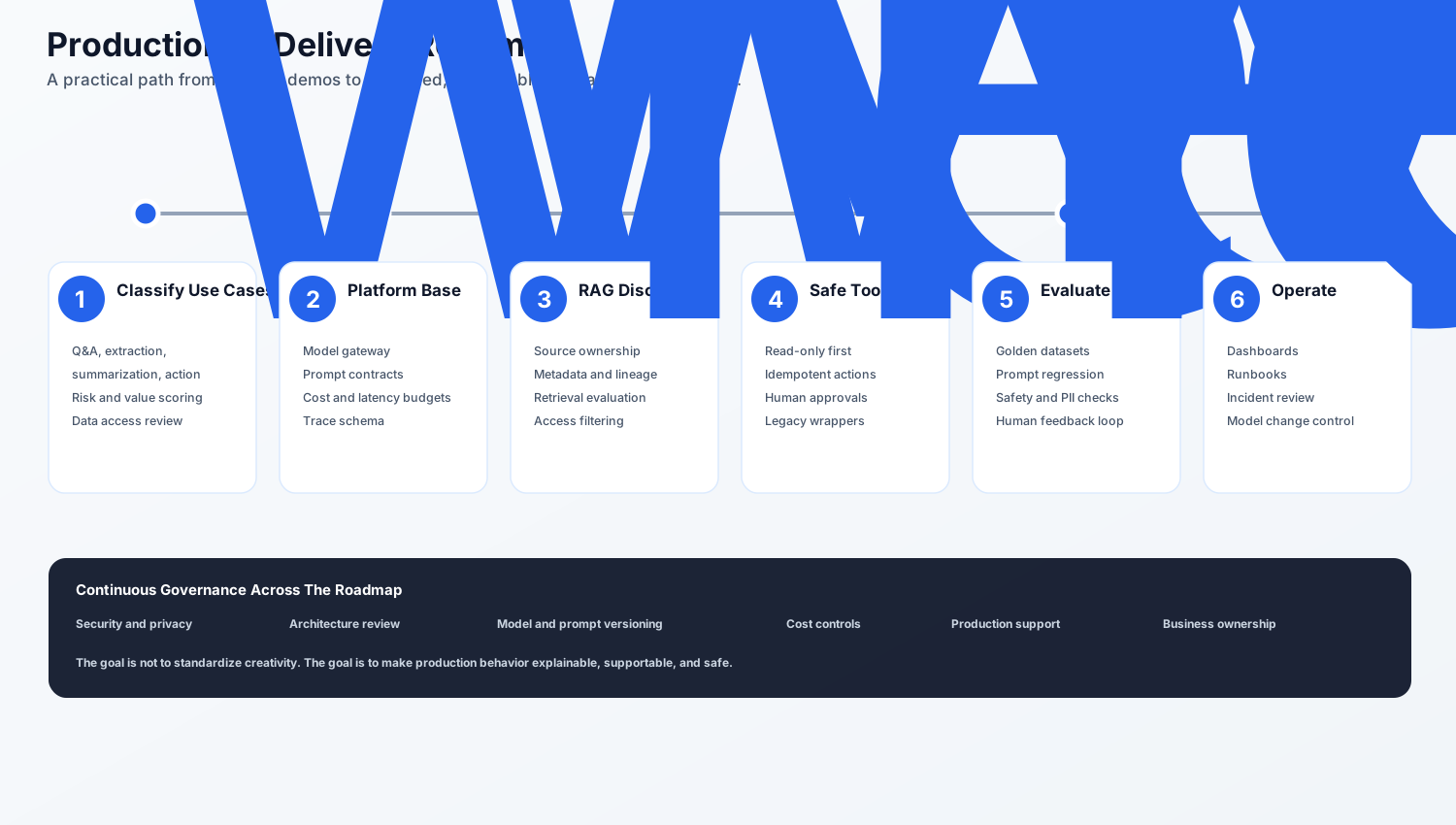
The sequence matters.
Phase 1: Classify use cases
Do not start with tools.
Create an AI use case inventory and classify each item:
- Q&A
- Summarization
- Extraction
- Decision support
- Workflow automation
- Agentic action
Then score each use case by value, data sensitivity, complexity, risk, and operational impact.
Phase 2: Build the platform base
Create the minimum shared platform foundation:
- Model gateway
- Prompt contract format
- Trace schema
- Basic policy checks
- Cost and latency budgets
- Capability API pattern
This avoids every team creating a separate AI stack.
Phase 3: Bring discipline to RAG
Treat knowledge as a governed product:
- Source ownership
- Metadata standards
- Chunking strategy
- Entitlement filtering
- Retrieval evaluation
- Citation rules
- Content correction process
RAG should not become a document dumping ground.
Phase 4: Add safe tools
Introduce tools gradually:
- Read-only tools
- Low-risk write tools
- Human-approved actions
- Fully automated actions only for low-risk, well-tested workflows
Every tool should have a contract and an audit trail.
Phase 5: Establish evaluation
Create a repeatable evaluation harness:
- Golden datasets
- Prompt regression tests
- Retrieval quality tests
- Model comparison
- Human feedback loop
- Release gates
This is the difference between a demo and a controlled production system.
Phase 6: Operate it like a platform
Once AI capabilities are live, operate them properly:
- Dashboards
- Alerts
- Runbooks
- Cost reports
- Incident reviews
- Model change control
- Data quality reviews
- Business outcome reviews
AI is not “set and forget”. It is a production workload.
The first production slice I would build
I would not start by building a giant platform.
I would start with two or three real use cases that force the platform to prove itself without taking on unnecessary risk.
For example:
- A policy-answer capability with governed RAG and citations.
- A case-summary capability that reads approved customer-service context.
- A read-only investigation assistant that can call a small set of approved tools.
This first slice should include:
- One capability API pattern
- One model gateway
- One governed knowledge source
- One trace schema
- One evaluation harness
- One approval pattern for higher-risk actions
- One dashboard for cost, latency, quality, and failures
That is enough to learn where the real friction is.
The goal of the first production slice is not to support every AI use case. The goal is to prove the operating model.
Once the operating model works, adding new capabilities becomes much easier.
A concrete walkthrough
Let us take a payment investigation assistant.
The business request sounds simple:
“When a customer calls about a failed payment, help the agent understand what happened and prepare the next response.”
This is exactly the kind of use case where teams are tempted to say, “Let us build an agent.”
But the architecture should be more deliberate.
The assistant should not start with a blank prompt and direct access to payment systems. I would design the flow like this:
| Step | What happens | Why it matters |
|---|---|---|
| 1. Capability call | Contact center calls POST /ai/payment-investigation with customer, case, role, purpose, and correlation ID. | The channel consumes a business capability, not a raw model. |
| 2. Policy check | The platform checks whether this user can investigate this customer and payment context. | Access control happens before retrieval or tools. |
| 3. Context retrieval | The RAG layer retrieves payment runbooks, failure-code documentation, and servicing policy for the right region. | The answer is grounded in governed knowledge. |
| 4. Tool execution | Approved read-only tools fetch payment status, recent retry attempts, case history, and system incident status. | The assistant sees operational facts without direct system access. |
| 5. Reasoning and draft | The model summarizes the likely cause, missing information, and next response for the agent. | The model assists judgment instead of silently taking action. |
| 6. Human approval | Any refund, reversal, complaint update, or customer notification goes through workflow approval. | Sensitive actions stay auditable and controlled. |
| 7. Trace and feedback | The trace stores prompt version, model route, documents, tools, policy decisions, cost, latency, and agent feedback. | Support and governance can reconstruct what happened. |
A simplified response might look like this:
{
  "caseId": "case_8472",
  "summary": "The payment failed after bank-side timeout. No debit confirmation was received from the payment rail.",
  "recommendedNextStep": "Ask the customer to wait for automatic reversal before retrying. Escalate if reversal is not visible within the policy window.",
  "confidence": "medium",
  "sources": [
    "payments_failure_runbook_v6",
    "customer_servicing_policy_v4"
  ],
  "toolsUsed": [
    "paymentStatus.read",
    "caseHistory.read",
    "paymentRailIncident.read"
  ],
  "requiresApprovalFor": [
    "manual_reversal",
    "customer_notification"
  ]
}
This walkthrough shows why production AI is rarely just one component.
The value comes from the assistant, but the reliability comes from the surrounding architecture: capability API, policy checks, governed retrieval, tool contracts, workflow approval, evaluation, and traceability.
This is also where many teams underestimate effort. The model response may take a few days to prototype. The production controls around it are what decide whether the capability can be trusted.
Common architecture mistakes
Mistake 1: Using agents where a workflow is enough
If the steps are known, use a workflow.
Use agents when the system genuinely needs reasoning over next steps and tool selection.
Mistake 2: Letting every team choose its own model integration
This creates cost, security, and observability problems.
Centralize model access through a gateway.
Mistake 3: Treating RAG as search with embeddings
RAG needs ownership, freshness, access control, metadata, and evaluation.
Embeddings are only one part of the architecture.
Mistake 4: Ignoring legacy integration
Most enterprise value sits behind old systems.
If AI cannot safely interact with those systems, the use case remains shallow.
Mistake 5: Skipping observability
If you cannot trace the prompt, model, context, tool calls, policy decisions, and response, you cannot support the system.
Mistake 6: No evaluation before model or prompt changes
Model behavior changes. Prompts change. Retrieval content changes.
Without regression tests, quality problems will reach users before the team notices.
Mistake 7: Building a platform without product pressure
An AI platform built in isolation can become a collection of impressive components that nobody uses properly.
Use real journeys to shape the platform. Otherwise the platform team may optimize for technical completeness instead of adoption, supportability, and business value.
Mistake 8: No business owner for AI quality
Engineering can own the platform. It cannot be the only owner of answer quality.
For each capability, someone from the business side should own what good looks like, what unacceptable looks like, and when the system is ready for a wider audience.
A review checklist I would use
Before taking an AI capability to production, I would ask:
- What business decision or workflow does this capability support?
- Is this Q&A, summarization, extraction, decision support, or action-taking?
- Which model route is used and why?
- What is the fallback path?
- Which data sources are used?
- Who owns those sources?
- How are permissions applied before retrieval?
- What is the evaluation dataset?
- What telemetry is captured?
- What is the cost budget?
- What is the latency budget?
- What happens when the model is unavailable?
- Can the system write to enterprise systems?
- If yes, where is the approval and audit trail?
- Who supports this in production?
If these questions are not answered, the system is not ready.
Final thought
Production AI architecture is messy because AI touches everything: applications, data, integration, operations, security, cost, and human decision-making.
The solution is not to ban experimentation. Experimentation is useful.
The solution is to stop confusing experiments with production architecture.
Build demos quickly. Learn from them. Throw away weak ideas without ceremony.
But when a use case matters, put it behind a real platform boundary:
- Stable AI APIs
- Model gateway
- RAG discipline
- Safe tool contracts
- Evaluation harness
- Observability
- Policy controls
- Legacy integration layer
- Production ownership
AI should not become another pile of unowned integration logic.
The best production AI architecture is not the one with the most frameworks. It is the one where the boring questions have clear answers:
- Who owns this capability?
- Which data was used?
- Why was this model route selected?
- What was the system allowed to do?
- How do we know the output was good enough?
- What happens when it fails?
If we can answer those questions, AI becomes a platform capability.
If we cannot, it becomes the next generation of technical debt.
Related Reading
- Creating a Customer 360 Degree Solution for Banks - why AI-ready customer experiences need data ownership, consent, and identity resolution
- Digital Banking Modernization Case Study - platform modernization patterns for regulated environments
- APIs Are Forever - why AI capabilities should be exposed through stable contracts
- Authenticating Services in a Microservices Environment - securing service-to-service and tool-based architectures
Want to apply these ideas in your organization?
I help fintech and banking teams turn architecture insights into practical execution plans.